> ## Documentation Index
> Fetch the complete documentation index at: https://wb-21fd5541-aguspan-docs-create-custom-signal.mintlify.site/llms.txt
> Use this file to discover all available pages before exploring further.
# Create a custom signal
> Create a custom W&B Weave signal to tag agent turns for a behavior you define.
A custom signal scores agent turns against a behavior you define, then shows that result as a tag in the [Agents view](/weave/guides/tracking/view-agent-activity). W\&B Weave also provides [built-in signals](/weave/guides/tracking/view-agent-signals) for common cases such as user frustration and jailbreaking. When those built-in signals don't cover what you want to monitor, create a custom signal. This page shows you how to create that custom tag signal in the Weave UI.
## Create a custom tag signal
To create a custom tag signal:
1. Navigate to [wandb.ai](https://wandb.ai/) and select your project.
2. In the **Weave project sidebar**, click **Agents**.
3. In the tab bar, click **Signals**.
4. On the Signals tab, click **+ Create your first signal**.
5. In the dialog, click **Custom Signal**.
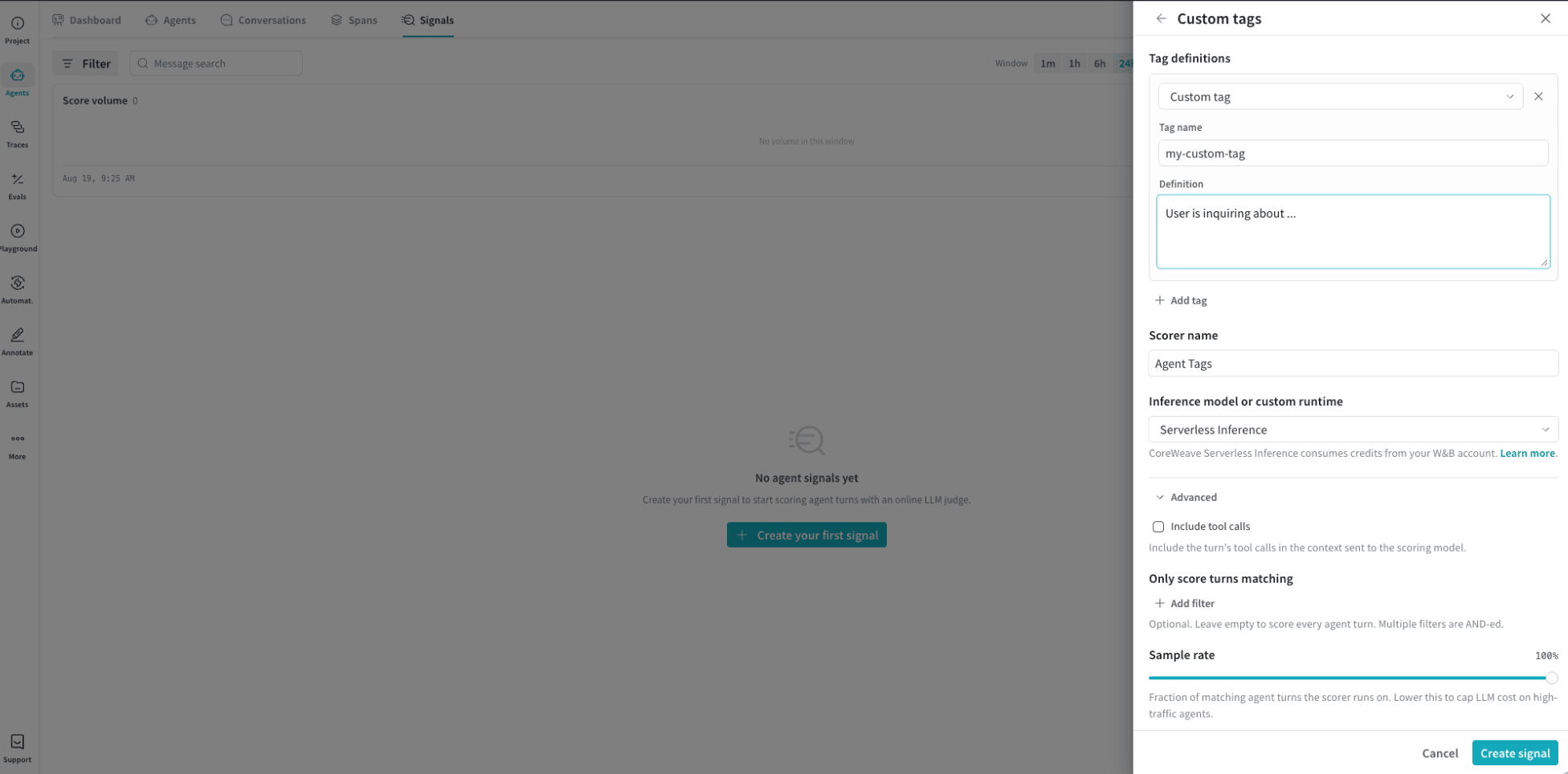 1. In the **Custom tags** drawer, configure the following fields:
* **Tag name**: The label that appears in the Agents view for the behavior you want to monitor.
* **Definition**: Describe the behavior the signal should detect.
* (Optional) **+ Add tag**: Click to define another tag on the same signal.
* **Scorer name**: The display name for this signal.
* **Inference model or custom runtime**: The model used to score matching turns. [Serverless Inference](/inference/) is the default. CoreWeave Serverless Inference consumes credits from your W\&B account.
* (Optional) **Include tool calls**: Expand **Advanced**, then include the turn's tool calls in the context sent to the scoring model.
* (Optional) **Only score turns matching**: Expand **Advanced**, then add filters to restrict which turns the signal scores. To score every agent turn, leave this field empty.
* (Optional) **Sample rate**: Expand **Advanced**, then set the fraction of matching agent turns the signal scores. To reduce cost on high-traffic agents, we recommend lowering the sample rate.
2. In the **Custom tags** drawer, click **Create signal**.
After you create the signal, Weave scores matching turns. The tag appears in the Agents view, including on the Signals tab.
1. In the **Custom tags** drawer, configure the following fields:
* **Tag name**: The label that appears in the Agents view for the behavior you want to monitor.
* **Definition**: Describe the behavior the signal should detect.
* (Optional) **+ Add tag**: Click to define another tag on the same signal.
* **Scorer name**: The display name for this signal.
* **Inference model or custom runtime**: The model used to score matching turns. [Serverless Inference](/inference/) is the default. CoreWeave Serverless Inference consumes credits from your W\&B account.
* (Optional) **Include tool calls**: Expand **Advanced**, then include the turn's tool calls in the context sent to the scoring model.
* (Optional) **Only score turns matching**: Expand **Advanced**, then add filters to restrict which turns the signal scores. To score every agent turn, leave this field empty.
* (Optional) **Sample rate**: Expand **Advanced**, then set the fraction of matching agent turns the signal scores. To reduce cost on high-traffic agents, we recommend lowering the sample rate.
2. In the **Custom tags** drawer, click **Create signal**.
After you create the signal, Weave scores matching turns. The tag appears in the Agents view, including on the Signals tab.